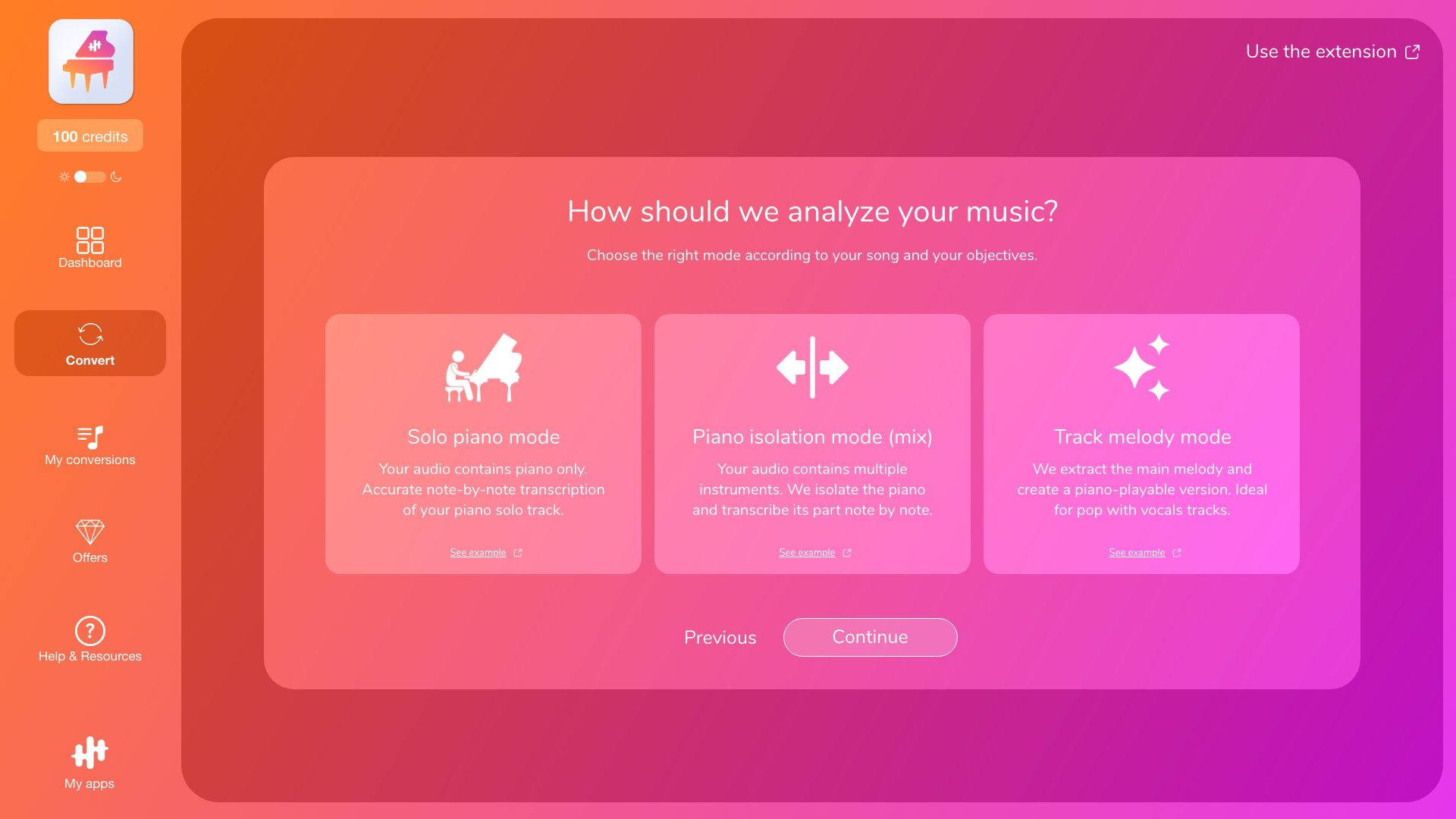
In La Touche Musicale’s conversion apps, there are 3 modes:
-
Transcription (solo instrument)
-
Instrument Isolation (mix) + Transcription
-
Melody / Arrangement (playable adapted version)
1) Transcription: faithfully reproduce an instrument (note by note)
Transcription is designed to capture, as accurately as possible, what the target instrument is really playing in your audio.
It’s the right choice if the instrument you want is clearly present and easy to hear.
There are 2 different situations, and therefore 2 transcription modes: solo instrument or instrument within a mix.
Mode A — Solo instrument transcription (note by note)
Use this if your audio contains only the target instrument (no vocals and no other instruments).
Examples: solo piano, solo guitar, a cappella vocals.
What you get: a note-by-note transcription of everything played by the instrument in the audio.
Why this mode is the most reliable: when the instrument is alone, the AI has less “audio competition,” so there’s less risk of missing notes or misassigned notes.
Avoid this mode if you can hear vocals, drums, bass, guitar, synths, etc.—even faintly in the background.
In that case, switch to Instrument Isolation (mix).
Mode B — Instrument isolation (mix) + Transcription (note by note)
Use this if your audio contains multiple instruments, including the target instrument.
Examples: piano + vocals + guitar, guitar + drums, vocals + instruments.
What the app does:
-
it tries to isolate the target instrument as much as possible from the mix,
-
then it transcribes note by note only that instrument’s part.
What you get: a note-by-note transcription of your instrument’s part, isolated as much as possible from the rest of the music.
Key point: quality depends heavily on the mix.
The clearer and more upfront your instrument is, the fewer missed notes you’ll get.
2) Melody / Arrangement: get a playable version adapted to your instrument
Melody / Arrangement is designed to create a playable musical version for the output instrument, adapted to it (range/tessitura, playability, voicings/accompaniment depending on the instrument, etc.).
Here, the goal is not to reproduce an existing track exactly, but to generate a coherent, melodic, and practical to play musical result.
This is the right choice if:
-
your audio is a produced song / a complex mix (often pop with vocals),
-
you want a playable version (melody + accompaniment) rather than a faithful extraction,
-
the output instrument isn’t present in the audio.
Real examples: the right choices
Example 1 — Full song (mix) → playable piano version
Your audio contains guitar, vocals, drums, bass; you want a playable piano version (melody + accompaniment) as sheet music and MIDI.
→ Recommended choice: PianoConvert + Melody / Arrangement (there isn’t a clear piano part to transcribe).
Example 2 — Solo instrument → faithful transcription
You have a YouTube link with only guitar; you want to replay exactly what the musician plays (sheet music + tablature).
→ Recommended choice: GuitarConvert + Solo instrument transcription.
Example 3 — Instrument present in a mix → isolation + transcription
Your audio contains piano + vocals + drums; you want to retrieve only the piano part exactly as it’s played in the original.
→ Recommended choice: PianoConvert + Piano isolation (mix).
2 common cases (and how to avoid the mistake)
Case 1 — “I want a piano score for a full song”
You import a pop song (vocals + drums + bass + synths) and want a usable piano score.
Pitfall: choosing Transcription (there’s no clear piano track to extract).
→ Recommended choice: PianoConvert + Melody / Arrangement.
Case 2 — “I want to transcribe my instrument in a mix, but it’s buried”
You want to transcribe a guitar part in a song where it’s in the background.
Pitfall: expecting a complete transcription when the instrument is hard to hear.
→ Recommendation: try Instrument Isolation (mix) on a section where the instrument stands out; if you mainly want a playable score, use Melody / Arrangement instead.
How to choose in 10 seconds
1. Is the instrument I want as output actually present in my audio?
-
Yes → Transcription is possible
-
No → Melody / Arrangement recommended
2. If I want to transcribe: is my instrument solo or in a mix?
-
Solo instrument → Solo instrument transcription
-
Instrument in a mix → Instrument Isolation (mix) + Transcription
3. Do I want “faithful to the original” or “playable/adapted”?
-
Faithful → Transcription (solo or isolation depending on the audio)
-
Playable/adapted → Melody / Arrangement
Go further
“How it works (import → mode selection → options → conversion → download)”
“Detected instruments: how to read them and correct them”
